













Every website plan must consider an email strategy since it’s the rails that established your business communication and is essential to fortifying your brand.
Read how your domain address improves SEO.
Since Gmail came online it was easy to connect your website email to our gmail account- for free. Effective in 2026, to keep using that feature, Gmail is requiring that you pay a subscription to use Google Workspace.
What this means is that fetching emails from third-party accounts, your website email addresses, into your Gmail account, with POP, will no longer be supported.
OPTIONS
There are two options to continue receiving website email into your gmail account.
- Purchase a subscription to Google Workspace.
Google Workspace is a cloud-based productivity suite developed by Google, designed to help teams communicate, collaborate, and get work done from anywhere. It combines popular tools like Gmail, Google Drive, Docs, Sheets, Slides, Meet, Chat, Calendar, and Forms into a single, integrated platform.
Your subscription allows you to continue using existing gmail account and the POP feature will remain active, as long as you Google Workspace subscription is active.
- You can forward your email from the website server to your gmail account.
This does not have a fee. However, the one caveat is that many website hosting services do not allow you to forward website email accounts to gmail.
While the technical aspects are unclear as to their reasoning, I believe that this method creates more spam because no is no verification accomplished. Using POP includes a verification process to set up receiving email.
COMPARISON
There are three important aspects to consider about POP and forwarding email.
-
Spam Score is important to consider. Using POP reduces your spam score, while forwarding email may negatively impact your spam score. Spam scores are a variable in Google algorithms to determine your Domain Authority.
-
Search Engine Optimization (SEO) for your website will be better off using POP than forwarding email. It’s important to remember that Google search is the backbone of determining SEO rankings. If your spam score is high than that will negatively contribute to your organic search rankings, which means a probability of reducing your organic search listings.
-
Cost is important to consider. The free way is always the best method, but in this case I am not so sure. With POP you remain in control of fetching emails quickly from your web server email. Conversely, forwarding mail is not in your control and may take longer.
SUMMARY
Today, Google is no longer allowing any additions of POP function to any gmail account. They say that sometime in 2026, no specific date, they will deactivate the POP function on existing gmail accounts that use it.
If you start using mail forward, using your website c-panel dashboard, while keeping POP then you will receive email duplicates, and that will add some confusion to the inbox.
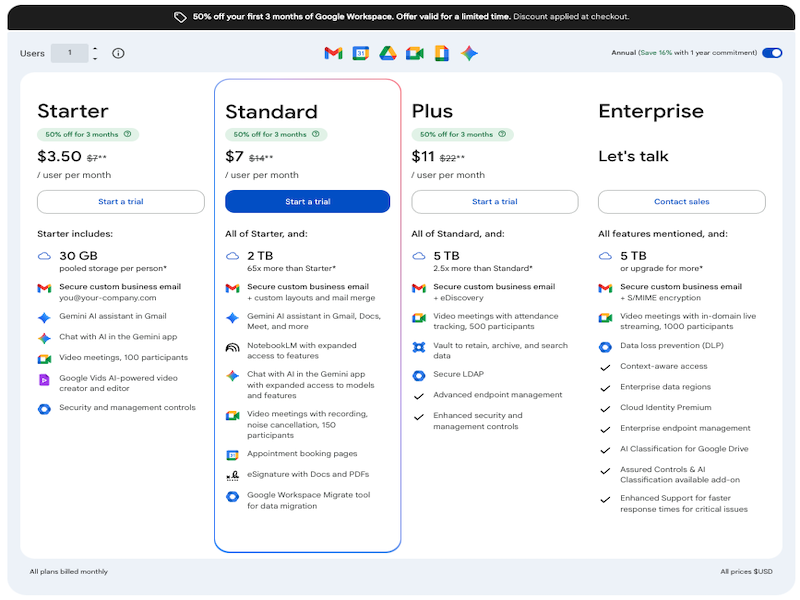
I went ahead an purchased a Google Workspace subscription: Google Workspace Business Starter. In Google Workspace your costs depends on how many users will use the dashboard, which translates the POP service. The lowest price plan is one email account (one user).
If you are using more than one email at your website, you may want to consider forward website email addresses to one specific website email address. This allows you to continue using your gmail account as it's current setup, and just use that one specific email address versus using three or four email addresses, which benefits you by lower subscription fee.
This image below is a comparison of Google Workspace subscriptions as of February 6, 2026.
Read about the Google Workspace account features here.
Stop Pauing More For Less
I have a method that will get you off the Gmail and Gogle pay wagon. This email tool costs less and does more. It also migrates all of your gmail, keeping the same folders and all existing email for free migration. I know how to get this done including setting up your domain email address as the primary sending account. Stop wasting time with gmail and ask me how to get 'er done. Call me at (727) 370-0011 to schedule a consultation.
If you have any questions, I am here to help.
Steu Mann
Feb 5, 2026