







Organic Search Drives 53% Of Website Traffic
April 21, 2026
You’re spending 15 hours a week on content distribution. Here’s how RSS cuts that to 2.
Let me introduce you to Regan.
Regan runs a small restaurant. He writes two blog posts per week, records a short podcast for her clients, and curates three industry news roundups. Then the real work begins: sharing everything on LinkedIn, Twitter, Facebook, two Slack communities, and a weekly email newsletter.
Every. Single. Time.
By Friday, he’s exhausted. Organic reach feels like a myth. Automation sounds scary. And he’s secretly wondering if anyone even sees her content anymore.
Sound familiar?
Now meet Mike who runs a Italian bakery. Same audience size. But Mike has a secret weapon: RSS feeds.
He publishes once. RSS handles the rest. His organic traffic is up 40% year over year. He spends about 90 minutes total each week on distribution. And his leads? They come to him now.
What’s the difference? Automation. Smart, human-friendly automation powered by a technology most people wrote off years ago.
Let me show you exactly how it works, why it’s perfect for website owners and media brokers, and how you can set it up today.
What RSS Actually Means Without Jargon
RSS stands for Really Simple Syndication. The name is awful. The technology is brilliant.
Think of an RSS feed as a living, breathing table of contents for your website. Every time you publish a new blog post, podcast episode, video, or even a news mention, that item automatically appears in your feed. No extra work. No manual updates.
Now here’s the magic: other tools can subscribe to that feed. A newsletter system sees a new item and sends an email. A social media scheduler sees a new item and posts to Twitter. A Slack bot sees a new item and announces it in your team channel.
You publish once. Everything else happens on autopilot.
And no, RSS is not dead. In fact, it’s quietly having a renaissance. People are tired of algorithm-driven social feeds. They want direct, predictable access to the content they actually care about. RSS gives them that. And it gives you back hours of your week.
RSS won’t replace strategy. It won’t write your content for you.
But it will handle the thankless, repetitive work of distribution.
It's easy to get started. You can hire me or do it yourself. Either way, an RSS feeds are the secret weapon to automate content distribution.
Put These RSS Benefits To Work
Benefit 1
Automation That Doesn’t Feel RoboticThe biggest fear around automation is losing your voice. Will posts feel spammy? Will you miss real engagement opportunities?
Here’s the truth: RSS automation frees you up to actually engage, instead of spending all your time copying and pasting links.
Let’s look at the numbers.

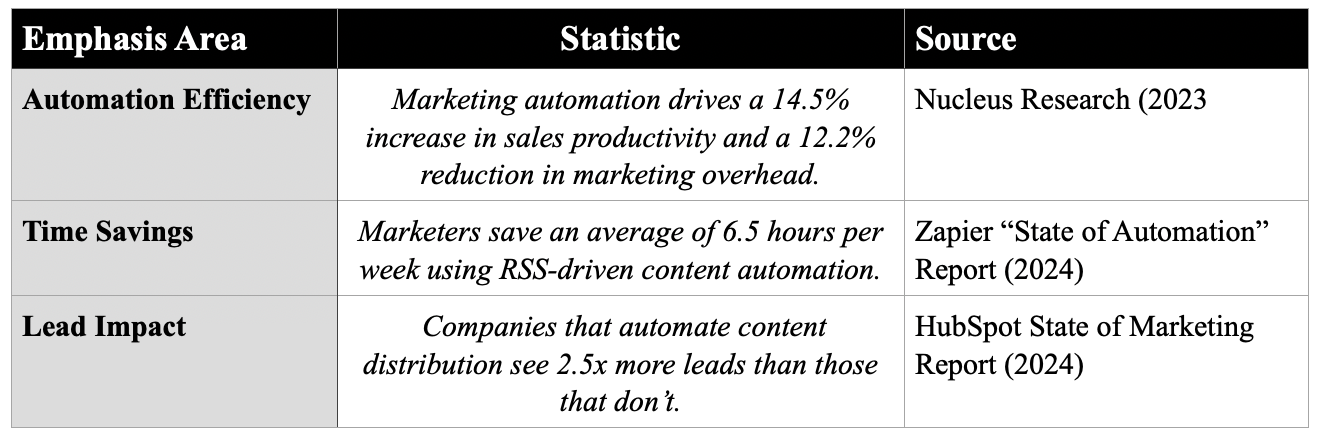
6.5 hours per week. That’s an entire workday you could spend on strategy, client work, or—let’s be honest—leaving the office at a reasonable hour.
Real workflow examples for media brokers
- Blog post → Twitter + LinkedIn + Facebook (with different captions using dynamic fields)
- New podcast episode → Email newsletter + YouTube description + Slack channel
- Client mention in the news → Automated alert to your team + curated “press roundup” page
- Competitor publishes a new case study → RSS alert to your research folder
None of this feels robotic if you set it up right. Use custom message templates, add manual review for high-stakes channels, and always keep your brand’s personality front and center.
Benefit 2
Building Organic Results That Algorithms Can’t Take AwaySocial media is rented land. You don’t own your audience there. A single algorithm change can tank your reach overnight.
RSS feeds contribute to all the channels you control: websites, emails, blogs, videos channels like YouTube and Vimeo, and many more.
Here’s why that matters for organic growth.

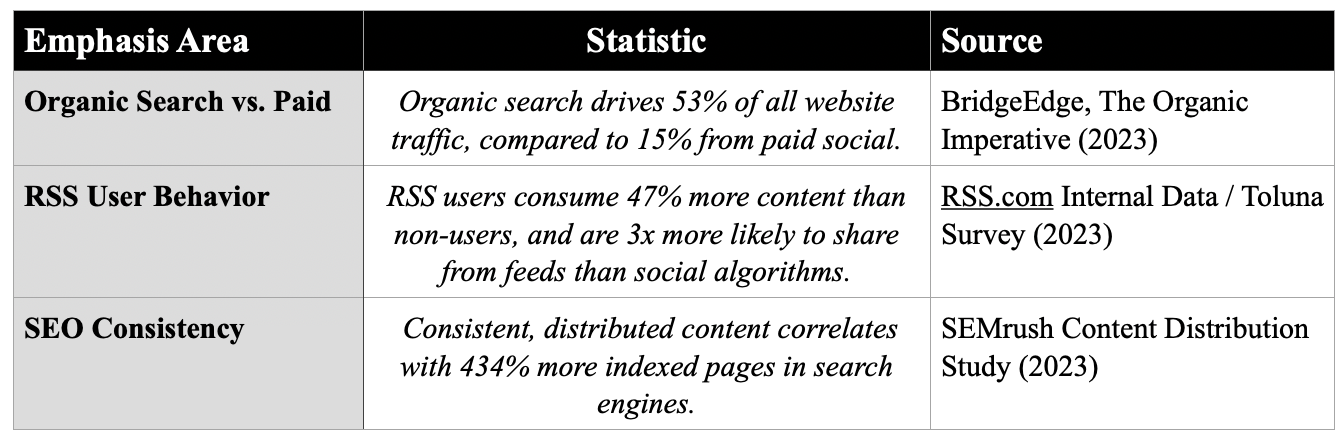
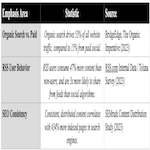
Let that sink in. 434% more indexed pages. When your content is automatically distributed across multiple channels (including your own RSS feed itself), search engines see fresh, linked activity. They crawl you more often. They index you deeper.
And those RSS users? They’re not passive scrollers. They’ve actively subscribed to you. They want your content. That’s why they consume almost 50% more and share three times as often.
Organic results aren’t just about SEO rankings. They’re about building an audience that comes back without you chasing them. RSS turns one-off visitors into repeat readers, because they can subscribe to your feed and never miss an update.
Benefit 3
Improving Your Online Business Presence“Online presence” is vague. Let’s make it concrete for website media brokers.
1. Activity reporting automation
You can easily monitor your RSS activity without manually clipping coverage. Set up an RSS feed that monitors Google News for your brand name. Each new mention automatically is sent to your inbox or a productivity tool such as a Slack channel. You see real-time results without lifting a finger.
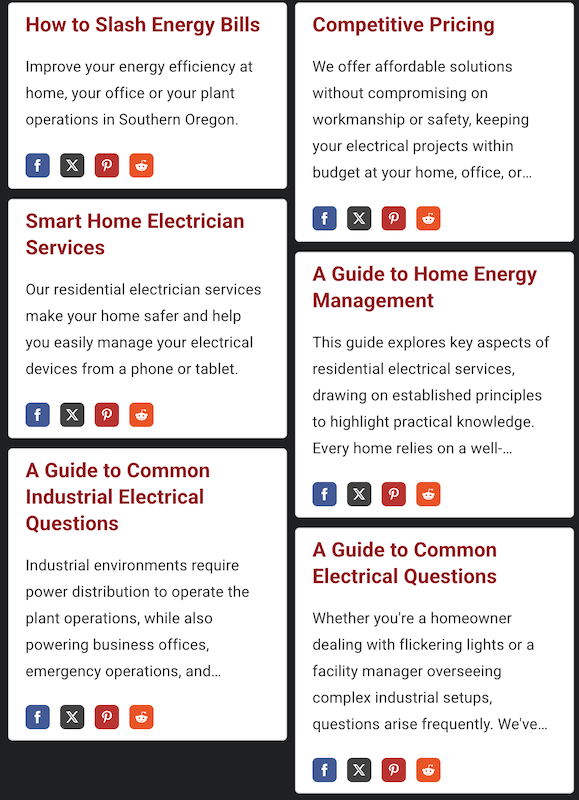
RSS Widget Fro Service Contractor
2. Competitive intelligence
Monitor your top three competitors’ blog feeds. When they publish something new, you get an alert. Not to copy them but to respond faster, write better counter-perspectives, and share the gaps they missed. That’s proactive positioning.
3. Lead generation via opportunity feeds
Many RFPs, job boards, and news sites for local business offer RSS feeds. Subscribe to them. Automatically filter for keywords you use in your SEO strategy. Every new lead lands in your CRM without a single manual search.
4. Content curation for authority
You don’t have to create everything. Use RSS to pull in third-party industry news. Share the best five articles each week in a “Friday Market Brief” newsletter. You become the trusted filter for your audience, and you didn’t write a single one of those articles.
Each of these builds presence by making you useful, visible, and consistent without burning hours.
Your 5 Step Setup Blueprint
You don’t need a developer. You don’t need a budget. You need 30 minutes and a free account on one of the tools below.
Step 1: Identify your content sources
Make a list of everything you publish regularly:
- Blog posts
- Podcast episodes
- YouTube videos
- Client success stories (new pages)
- News mentions (yours or clients’)
Step 2: Find or create your RSS feeds
- WordPress sites: Your feed is usually yoursite.com/feed
- Podcasts: Your podcast host gives you an RSS feed (e.g., on Buzzsprout, Transistor, or Libsyn)
- YouTube: Every channel has an RSS feed via https://www.youtube.com/feeds/videos.xml?channel_id=CHANNELID
- No feed yet? Use a tool like FetchRSS to create one from any webpage.
Step 3: Choose your automation tools
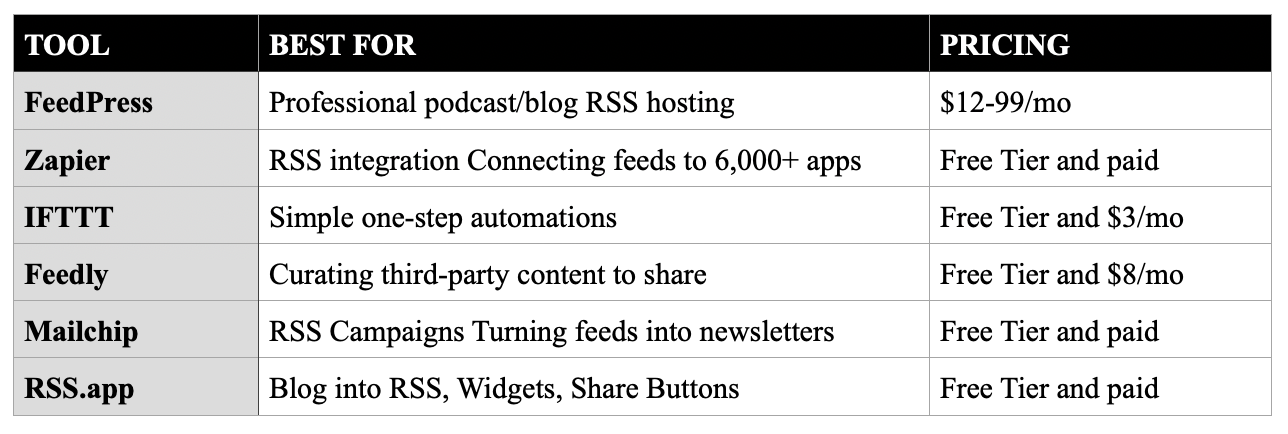
Easy to start with RSS.app using yor current blog, their widgets can be plugged into a website and social media.
Step 4: Set up distribution rules
Be intentional. Don’t blast everything everywhere.
- Blog post → LinkedIn article + Twitter thread link + Slack announcement
- Client news mention → Email to client + internal team alert
- Weekly roundup → Mailchimp RSS campaign (sends automatically every Friday)
Step 5: Monitor and optimize
After two weeks, check:
- Which automated posts get the most clicks?
- Are any channels underperforming? Pause them.
- Did you save the time you expected? (Use a simple time log.)
Then examine the voulme of feed and its locations. Is it time to scale up?
Common Objections Addressed
“Isn’t RSS dead?”
No. It never died, it just went quiet. Major platforms like Apple News, Spotify, and even Google Podcasts run on RSS. Millions of newsletters are powered by RSS-to-email. The technology is more reliable than ever.
“Won’t automation make my content feel spammy?”
Only if you automate poorly. The secret: write your social captions once inside your CMS or RSS tool. Use variables like {title} and {link} but add human commentary. Also, never auto-post to high-engagement channels like LinkedIn comments or Facebook Groups. Leave those for manual interaction.
“I’m not technical.”
You don’t need to be. IFTTT and Zapier are visual, drag-and-drop tools. Feedly and Mailchimp have step-by-step wizards. If you can copy and paste a URL, you can set up an RSS automation.
“Will this hurt my SEO because of duplicate content?”
No. RSS feeds themselves are just XML files. Search engines don’t penalize you for having a feed. And when you auto-post to social media, those are different domains. The canonical source remains your original post.
Measuring Success: What To Track
Don’t set it and forget it.
Measure these three things every month:
1. Time saved: Compare hours spent on distribution before vs. after RSS.
2. Referral traffic: Use Google Analytics to see which automated channels send the most visitors.
3. Lead attribution: Ask new leads, “How did you hear about us?” Track RSS-driven referrals separately.
CASE STUDY
A small business, a plumbing service, was doing doing social marketing on their own before hiring me.
When i built and installed their RSS, along with using my content development services, they saw a 190% gain in social media followers during the the first year.
They saved the time from doing social media on their own, which wasn't a lot of hours, but was a pain in the neck for them - another unwanted task they were doing but hated.
Their website saw more new visitors and increased page reading on the average website visit.
Next Steps
Option 1
Do it yourself Start with the 5-step blueprint above. Pick one RSS automation (e.g., blog post to Twitter) and set it up this week. You’ll know within 48 hours if it works for you.
Option 2
Get expert help Not sure where to start? Or want an audit of your current content distribution? The team at ezweb.company specializes in media broker websites, automation workflows, and organic growth systems. We’ll look at your setup and show you exactly where RSS can save you 5+ hours per week.
👉 Contact Steu, (727) 370-0011, to schedule a 20 minute consultation about moving forward with your RSS feed today.

online marketing
Boost your brand with EZ Web Company’s SEO and social media marketing services.

website analytics
Unblock digital success with EZ Web Company’s guide to content management and SEO.

website packages
Custom website design, reliable web hosting, and e-commerce solutions tailored to your business.
Services
Website Tools
© 2026 EZ Web Company By Website Media Broker LLC :: 30725 US Highway 19, #236, Palm Harbor FL 34684 :: RSS :: (727) 370-0011